

Multi-instance control
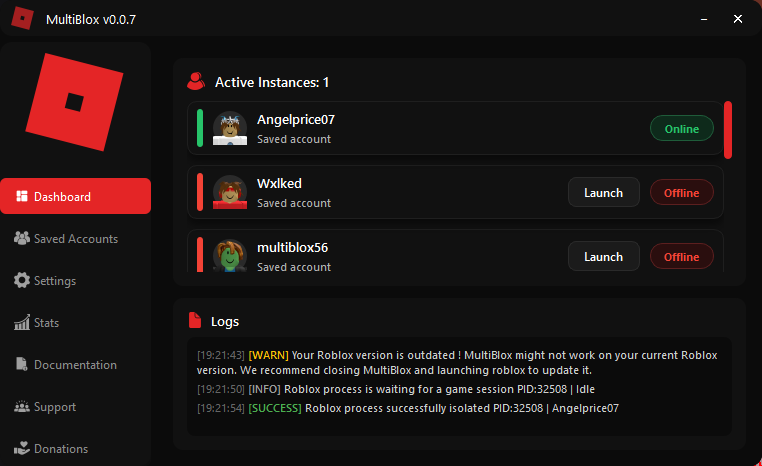
Keep multiple Roblox clients open while MultiBlox watches, isolates, and tracks every detected process.
MultiBlox is a focused desktop tool for running and managing multiple Roblox clients from one clean dashboard with saved accounts, groups, launch targeting, live process tracking, stats, automation, and more.
 One dashboard, every client
Watch a quick overview of the dashboard, saved accounts, multi-instance handling, and the workflow behind running multiple Roblox clients.
MultiBlox wraps multi-instance handling in a complete desktop workflow so repeated Roblox sessions are easier to launch, inspect, organize, and understand.
Keep multiple Roblox clients open while MultiBlox watches, isolates, and tracks every detected process.

Save your own accounts locally, configure launch targets, and start groups sequentially from one interface.

See online, offline, and idle clients with account identity, game context, logs, and per-instance actions.

Launch from roblox.com, open Roblox Player directly, or let MultiBlox launch a configured saved account.

Track play time, longest sessions, stability, launches, games, accounts, and a local rank progression system.

Tune launch safety, performance flags, scripts, anti-AFK, custom launchers, UI behavior, and advanced options.
MultiBlox does not force you into one launch method. All supported launch paths eventually feed into the same process detection and isolation pipeline.
Keep MultiBlox open, use the normal Play button on roblox.com, and let MultiBlox detect the new Roblox Player process.
MultiBlox can track the client before a game starts and display it as Idle until Roblox writes session information.
Configure a Place ID and optional server destination, then launch your own saved account directly from the Dashboard.